A call forwarding app can help you avoid missing client calls and prevent you from keeping them on hold for too long.
However, you may be missing what you need as a business if you only use basic call forwarding.
In this article, we’ll compare the best call forwarding apps that provide a better calling experience for your team and customers. Then we’ll share key scenarios where other business phone features can work better than a free call forwarding app.
What is call forwarding software?
Call forwarding software redirects incoming calls from one number to another. If you’re unavailable or using a different device, the call still reaches you or someone on your team. It’s a basic feature that helps make sure important calls don’t slip through the cracks — whether you’re in a meeting, on the go, or off the clock.
Comparing the best call forwarding apps

While many exist, here are 11 of the best call forwarding apps compared side-by-side.
| Provider | Starting price | Unlimited calling to US & Canada | SMS/MMS to US & Canada | Shared phone numbers | Call forwarding | Ring groups |
|---|---|---|---|---|---|---|
| OpenPhone | $15 per user per month | ✔️ | ✔️ | ✔️ | ✔️ | ✔️ |
| Hushed | $3.99 per month | Requires upgrade | ✔️ | ❌ | ✔️ | ❌ |
| Google Voice | $17 per user per month (including required Google Workspace subscription) | US customers only | US customers only | Requires upgrade (ring groups only) | ✔️ | Requires upgrade |
| Line2 | $7.99 per month | ✔️ | ✔️ | ❌ | ✔️ | ❌ |
| Grasshopper | $14 for one user | ✔️ | MMS messaging for local numbers only | ❌ | ✔️ | Requires upgrade |
| Nextiva | $20 per user per month | Requires upgrade | Requires upgrade | Requires upgrade | Requires upgrade | Requires upgrade |
| Phone.com | $15 per user per month | ✔️ | ✔️ (outbound requires upgrade) | ❌ | ✔️ | ✔️ |
| Ooma | $19.95 per user per month | ✔️ | Requires upgrade | ✔️ | ✔️ | ✔️ |
| Divert Calls | Free | ❌ | ❌ | ❌ | ✔️ | ❌ |
| Talkroute | $19 per user per month | ✔️ | 500 messages per month (unlimited requires upgrade) | ❌ | ✔️ | ✔️ |
| Calilio | $12 per user per month | ❌ | Pay per segment | ✔️ (ring groups only) | ✔️ | ✔️ |
Now let’s look at each of the best options in more detail, starting with the #1 rated phone solution as voted by thousands of professionals on G2.
1. Quo (formerly OpenPhone): Best call forwarding app for growing teams

Pros
- Simple call forwarding setup
- Unlimited calls and texts to the US and Canada
- Shared access to business phone numbers
- Internal comments and tags for team collaboration
- Customizable ring settings
- Missed call notifications via Slack and email
Cons
- Dependent on a stable internet connection*
*All VoIP phone systems require a strong internet connection. A good rule of thumb is at least 100 kbps upload speed available on each device and a good connection with less than 70 ms ping and jitter.
Quo is the modern cloud phone system for startups and small businesses. Once you get a second number from Quo or port your existing number, setting up call forwarding is easy.
But Quo offers far more than call forwarding. With a Quo plan, your team can call and text anyone in the US or Canada for free. You can also work together more effortlessly in Quo. Along with sharing access to a business phone number, you can leave comments visible only to your team and tag teammates to collaborate on responses.

Keep in mind you can also configure your business number to ring only during a specific time window and to ring specific teammates in a set order. Quo lets you set your availability so your phone only rings when someone calls during your workday.
If you want to automatically route calls to an outside number (such as an answering service or a call center) in case no one on your team picks up, you can set up conditional call forwarding on Quo.
With Quo (formerly OpenPhone), you can redirect calls you’ve already answered using call transfer. This allows you to connect the caller directly with the right person rather than having to ask the customer to call a different number.
You can configure Quo to send notifications for missed calls (and for missed voicemail and text messages). Quo will automatically notify you about these via email or Slack. So, even if you miss a call, you (or your team) can call back as soon as you see the notification.
Sona, Quo’s AI agent, can answer calls when no one on your team is available. It greets callers, responds to common questions, and takes messages so your small business can stay responsive at all times.OpenPhone also lets you automatically log all call activity in your CRM through integrations with apps like HubSpot and Salesforce. You can also use the Quo Make or Zapier integration to send appointment reminder texts when someone books through a tool like Calendly, so your team doesn’t have to send them manually.
Try out Quo for free, and get a virtual number (or easily port any existing number to Quo). To get started, sign up for a free seven-day trial.
Key features of Quo
- US, Canadian, and North American toll-free number options
- Unlimited calls and texting in the US and Canada
- Unlimited SMS and MMS in the US and Canada
- Forward text messages to any email address or Slack channel
- AI call summaries and transcripts
- Affordable international calling rates
- Integrations for customer relationship management (CRM) systems, Slack, Gong, Zapier, and more
- Auto-replies, snippets, scheduled text messages, and other ways to save time texting
- Desktop and mobile apps (Windows, Apple devices, and Android phones)
Quo pricing

Quo’s pricing offers three different plans:
- Starter: $15 per user per month for one new local or toll-free phone number per user, calling and messaging to US and Canadian numbers, voicemail transcriptions, Quo API, and more
- Business: $23 per user per month to access phone menus (IVR), call transfers, analytics, CRM integrations, and more
- Scale: $35 per user per month for AI call tags, dedicated onboarding, and priority chat and email support
2. Hushed: Best call forwarding app for personal use
Pros
- Unlimited local calling and texting (requires upgrade)
- Custom voicemail greetings for multiple numbers
Cons
- No shared numbers
- No toll-free numbers
- No integrations with third-party apps
- No desktop or browser apps
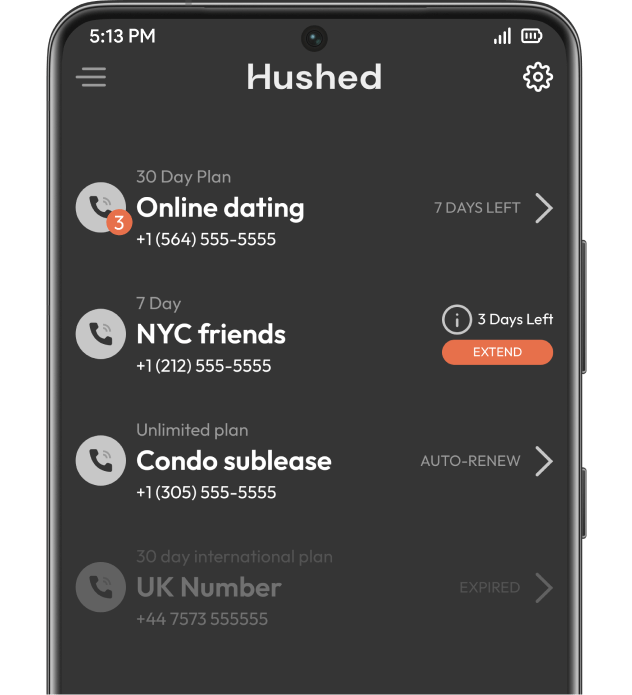
Hushed is a virtual phone number app for individuals. It offers users secondary phone numbers for multiple scenarios where users want to protect their privacy — and avoid using their personal phone numbers — like dating, sales, and shopping.
Hushed offers a suite of features to enhance secondary phone numbers, including call forwarding, call routing, phone numbers in 300+ area codes, and custom voicemail greetings for your Hushed number.
While Hushed is a great option for personal use, it lacks the features you need from a business phone, such as CRM integrations, shared numbers, desktop and browser apps, and call recording. If you plan to use Hushed for your business conversations, you should be prepared for extra admin work to keep track of everything you discuss with your customers.
Key features of Hushed
- Call forwarding
- Call routing
- Custom voicemail greetings
- Texting auto-replies
- Manage multiple private numbers
Hushed pricing

Hushed offers three plans to its customers:
- Prepaid: $3.99 for one number, all their features, and access to prepaid calling and texting plans
- Unlimited: $4.99 per month for one number, unlimited calling and texting in the US and Canada, and all other features
- Pay-as-you-go: $6.99 per month for one number, international calling, credit-based calls, and all other features
3. Google Voice: Best for Google Workspace users

Pros
- Unlimited calling
- Easy integration with Google Workspace
Cons
- No shared numbers
- Unavailable outside the US
- Requires an active Google Workspace subscription
- Can only link six numbers for forwarding
- Doesn’t integrate well with other tools
Google Voice has a call forwarding feature (with a few limitations). The primary drawback is that Google Voice’s free version was built for personal use, not business, so you won’t have shared access to any phone number. It’s not even available outside the US.
While you can switch to one of Google Voice’s paid plans, you must have an active Google Workspace subscription. This costs an extra $7 per user per month, bringing your total cost per user to at least $27 per month if you wish to have ring groups.
To forward calls, you need to “link” numbers to your Google Voice account. However, you can only link up to six numbers, and you can’t link numbers that are already linked to another Google Voice number. All linked numbers ring when someone calls your Google Voice number, or you can select the linked numbers or devices that receive calls.
However, you can’t create a work schedule to only receive calls during a specific time window. Also, keep in mind that incoming texts won’t forward to any number you link to Google Voice.
Google Voice’s limited features might work for you if you’re a solopreneur or just starting your company. However, if you need business call forwarding features that let you easily catch up on conversations or want to collaborate on customer communication with your team, consider other Google Voice alternatives.
Key features of Google Voice
- Unlimited calling
- SMS and MMS support
- Group text messaging
- Voicemail
- Call recording (requires upgrade)
Google Voice pricing

Google Voice’s pricing gives you three different plans to choose from:
- Starter: $10 per user per month (plus $7 per user per month for a Google Workspace subscription) to access voicemail transcriptions, Google Calendar Integration, and SIP link
- Standard: $20 per user per month to access on-demand call recordings, ring groups, and phone menus
- Premier: $30 per user per month to access automatic call recordings and advanced reporting
Looking for a better call forwarding option? Check out our comparison of Quo (formerly OpenPhone) vs Google Voice.
4. Line2: The most basic call forwarding option

Pros
- Unlimited calls to the US and Canada
- Call blocking and screening
Cons
- Runs on only one device at a time
- No missed call notifications
- Some users report customer service is inadequate
Line2 — an app that can give you a second phone number — allows basic call forwarding. With it, you can forward calls to your listed numbers in sequence or ring all numbers simultaneously. Alternatively, you can choose to ring one number first. If that call goes unanswered, Line2 then forwards it to the listed numbers.
Line2 also offers features like call blocking, call screening, and voicemail transcriptions. But you can’t get missed call notifications or shared access to phone numbers, and there’s no opportunity to set your business hours. Other key features are missing from Line2, including integrations, snippets, and auto-replies.
Key features of Line2
- Unlimited calls to the US and Canada
- Unlimited texts in the US
- Caller ID
- Call forwarding
- Voicemail transcriptions
Line2 pricing
- Annually: $13.75 per user per month
5. Grasshopper: Call forwarding option with custom schedules

Pros
- Custom greetings
- Auto-replies
- Voicemail transcriptions
Cons
- Only available in the US and Canada
- Lacks integrations
- Call recording requires an upgrade
Grasshopper, a virtual phone system, offers several call forwarding features. You can add a list of numbers you want to forward calls to. When someone calls, all of these numbers should receive incoming call notifications. You can also create custom schedules to forward calls to specific numbers during a specific time of the day.
Even though Grasshopper has good call forwarding features, it has several shortcomings. For example, you don’t get shared phone numbers for texting, and call recording requires you to upgrade. And it doesn’t integrate with popular tools like Slack, Gmail, Make, and CRM systems.
Their pricing structure may force you to switch to a Grasshopper alternative as your team grows. Grasshopper recommends its second-most expensive plan ($25 per month), which includes one phone number. As your team gets bigger, you’ll need to pay $9 per month for additional numbers — or switch to the highest-tier plan that comes with an even higher price tag ($55 per month).
Key features of Grasshopper
- Call transfer (requires upgrade)
- Custom greetings
- Voicemail transcription
- Call blocking
- Instant text response when there’s no answer
Grasshopper pricing

Grasshopper’s pricing provides three different plans:
- True Solo: $14 per month for one user, one phone number, and one extension
- Solo Plus: $25 per month for unlimited users, one phone number, and three extensions
- Small business: $55 per month for unlimited users, four phone numbers, and unlimited extensions
6. Nextiva: Best for large enterprises

Pros
- Ability to forward specific calls
- Customizable calling hours
- Location-based call forwarding for remote teams
Cons
- Voice calls require an upgrade
- Voice transcriptions require an upgrade
- Texting requires an upgrade
Nextiva is a customer experience platform that offers extensive call forwarding settings. You can forward calls automatically or only when you don’t answer them like you can on other services.
And with Nextiva, you can redirect specific calls. For example, you can forward calls from a particular number to a colleague during your lunch hour.
You can forward calls automatically if you’re on another call or unreachable because of a power or internet outage or if the WiFi has stopped working. Nextiva also offers location forwarding. This feature lets you forward calls to all team members in a specific location to another phone number or extension.
The problem with Nextiva is its confusing pricing structure. It offers four pricing tiers, and the lowest doesn’t offer voice calls at all. Instead, you’ll have to upgrade to the Core plan to make and receive calls, which costs $30 per user per month.
Plus, Nextiva forces you to upgrade for key features like voicemail transcriptions and SMS/MMS messaging.
Key features of Nextiva
- Voice and video conferencing (requires upgrade)
- Toll-free numbers (requires upgrade)
- Call routing (requires upgrade)
- Unified team interface (requires upgrade)
- Call recording (requires upgrade)
- Voicemail transcription (requires upgrade)
Nextiva pricing

Nextiva’s pricing has four tiers:
- Digital: $20 per user per month for competitive monitoring, messaging apps, social media channels, and review management
- Core: $30 per user per month for voice calls, 100 SMS and MMS per user per month, voicemail transcriptions, and mobile app
- Engage: $40 per user per month for voice analytics, toll-free numbers (2,000 minutes per month), 250 SMS/MMS per user per month, and digital fax
- Power Suite: $60 per user per month for API integrations, 10,000 toll-free minutes, skills-based routing, and unlimited SMS/MMS
7. Phone.com: The app for forwarding calls from specific contacts

Pros
- Business hours
- HIPAA-compliant video
Cons
- Call recording requires a paid add-on
- CRM integration requires an upgrade
- Voicemail transcription requires an upgrade
Phone.com is a HIPAA-compliant phone platform that offers basic call forwarding with a few options. You can set a schedule for forwarding calls after work hours or based on caller ID. Plus, you can include ring options such as duration and hold music.
If you’re only looking for a few additional call forwarding options, Phone.com gets the job done.
The real problem is that Phone.com offers many essential features as add-ons. For example, call recording will cost you $8 per month unless you’re on the top-tier plan.
Want to make international calls? You should know that you might need to pay a $200 deposit first.. Plus, you can’t send text messages at all unless you upgrade to the Plus plan, which costs $22.50 per user per month.
Key features of Phone.com
- Call log
- IVR
- Voicemail transcription (requires upgrade)
- Video conference calls
- CRM integration (requires upgrade)
Phone.com pricing

Phone.com offers three different pricing plans you can choose from.
- Basic: $15 per user per month for unlimited minutes, mobile phone apps, standard features, and video conferencing
- Plus: $22.50 per user per month to access outbound SMS, voicemail transcriptions, and desk phone compatibility
- Pro: $33.33 per user per month to access CRM integrations, 10-year data retention, and call recordings
8. Ooma: Best call forwarding app with hardware options

Pros
- Forward calls during device outages
- Unlimited calling to the US, Canada, Mexico, and Puerto Rico
Cons
- Voicemail transcription requires an upgrade
- Call screening requires an upgrade
- Phone calls on the desktop app require an upgrade
Ooma is a business phone system that integrates with traditional desk phones. Their service has limited call forwarding functionality, but it still gets the job done.
You can redirect incoming calls on your extension to another number. Once this is set up, you can toggle this feature on and off using the Ooma business phone app. You can also forward calls during device outages, helping prevent your business from losing out on any customers. And with multi-ring, multiple devices will ring when a call comes in — but there are limitations on how many different device types each user can add.
Beyond call forwarding, Ooma’s base plan doesn’t offer significant value. You’ll need to upgrade to one of their higher-tier plans ($24.95 or more per user per month) to access call recording, a desktop app, and even text messaging.
Key features of Ooma
- Unlimited calling to the US, Canada, Mexico, and Puerto Rico
- Virtual receptionist
- iOS and Android apps
- Google and Office 365 integrations (requires upgrade)
- Dynamic caller ID (requires upgrade)
Ooma pricing

Ooma Office’s pricing provides three different plans you can pick from.
- Essentials: $19.95 per user per month for call park, desktop app (without calling), ring groups, music-on-hold, and call forwarding
- Pro: $24.95 per user per month to access Ooma’s desktop app with calling, dynamic caller ID, and voicemail transcriptions
- Pro Plus: $29.95 per user per month to access team chat, advanced call management, and hot desking
9. Divert Calls: Best free call forwarding app

Pros
- Forward calls based on call status (busy, unanswered, unreachable)
- Choose specific contacts to forward calls from
Cons
- Doesn’t support third-party integrations
- App reliability issues reported by some users
- Includes ads unless you upgrade
If you’re looking for a basic way to forward calls from your iPhone, Divert Calls might do the trick. It’s a lightweight iOS app that lets you redirect incoming calls to another phone number — no extra equipment or complicated setup needed.
You can also choose when calls are forwarded. For example, you can automatically forward calls only when your number is busy, goes unanswered, or becomes unreachable. That way, you’re not missing calls when you can’t pick up the phone or don’t have service.
Need more control over which calls get forwarded? Divert Calls lets you select specific numbers from your contact list to redirect. This gives you a bit more flexibility than blanket call forwarding settings.
But the app does come with limitations that make it useful only for personal calling. Divert Calls doesn’t support third-party integrations, so you can’t connect it to your CRM, calendar, or other business tools. You’ll also see ads unless you pay $0.99 per month to remove them.
Beyond those drawbacks, you may run into reliability issues. Some users have noted that the app doesn’t always forward calls as expected, which can be frustrating if you rely on it to forward every call.

Key features of Divert Calls
- Forward calls when your phone is busy, unanswered, or out of reach
- Choose which contacts’ calls to forward
- Set up call forwarding directly from your iPhone
- No ads (requires upgrade)
Divert Calls pricing
Divert calls is free to download, with the option to remove ads for $0.99 per month.
10. Talkroute: Best for multi-digit extensions

Pros
- Supports call forwarding to landlines, cell phones, softphones, and satellite phones
- HIPAA compliant
Cons
- Simultaneous ring requires an upgrade
- No on-demand call recording
- Base plan only includes 500 texts per month
Talkroute is a virtual phone system that works on your computer, mobile phone, or desk phone — all you need is an internet connection. The platform lets you forward incoming calls to US or Canadian numbers, including landlines, cell phones, softphones, and even satellite phones. This means that with any device your reps use, you’ll be able to forward calls to their number.
Want to route calls to different team members at different times? You can create custom call forwarding schedules to control when and where calls are sent throughout the day.
If your business needs to stay HIPAA-compliant, Talkroute can support that, too. But keep in mind that you’ll need to disable certain features like voicemail-to-email since email can pose a security risk when handling patient information.
Talkroute comes with cons that might mean it’s not the best call forwarding app for your business. To use its simultaneous ring feature, which lets multiple phones ring at once, you have to upgrade to the Plus plan, costing $39 per user per month. And while it supports automatic call recording, there’s no option for on-demand recording.
It also has limits on texting. Talkroute doesn’t support international SMS, and its most affordable plan only includes 500 texts per month, which might not be enough if texting is a core part of your communication strategy.
Key features of Talkroute
- SMS and MMS
- Scheduled call forwarding (requires upgrade)
- Forward to a single phone
- Ring phones in sequence
- Toll-free numbers
Talkroute pricing

Talkroute’s pricing offers four different plans you can choose from:
- Basic: $19 per user per month for one number, one mailbox, unlimited calling, call forwarding, and call routing
- Plus: $39 per user per month for two numbers, three mailboxes, simultaneous ring, and live call transfer
- Pro: $59 per user per month for three numbers, 10 mailboxes, call recording, and scheduled call forwarding
- Enterprise: Contact for pricing for 10+ numbers, 20+ mailboxes, SLA, and account management
11. Calilio: Best for buying international phone numbers

Pros
- Access to virtual phone numbers in 100+ countries
- Includes live call monitoring tools for coaching and training
Cons
- Charges per minute for all calls and call recording storage
- No API and limited integrations
- Base plan is limited to 10 users
Calilio is a business phone system that gives you access to virtual numbers in over 100 countries. That makes it a solid option if you want to establish a presence in different regions.
You can forward calls to team members, no matter where they’re located. You can also set up conditional call forwarding to only redirect calls if your number is busy or you can’t pick up.
Need to coach your team in real time? Calilio also includes call monitoring tools that let managers listen in on live calls and offer feedback, helping reps improve their communication skills on the spot.
But there are a few trade-offs to keep in mind. Calilio charges per minute for every single call, which will cost you $0.0456 per minute for outgoing calls and $0.0346 per minute for incoming calls.
Want to store call recordings? You’ll have to pay for them, too, which costs $0.0048 per minute.
Plus, one Calilio user in April 2025 noted the platform could benefit from expanding its list of integrations to help speed up their workflow.

Key features of Calilio
- Call forwarding
- Number sharing
- Voicemail
- Call history
- Call filters
Calilio pricing

Here are the three Calilio pricing plans you can choose from:
- Basic plan: $12 per user per month for up to 10 users, one free local number, pay-as-you-go call recording and storage ($0.0048 per minute), and basic real-time dashboard
- Business plan: $28 per user per month for unlimited users, advanced reporting, business hours, and call transfers
- Enterprise plan: Custom pricing for queue call back, all call strategy features, a dedicated account manager, and WhatsApp support
How to choose the best call forwarding app
We looked at six important factors to find the best call forwarding apps for small businesses:
- Cost: As a small business, every dollar counts. Are you paying a flat rate, or are you charged per minute or feature?
- Flexibility: Can you forward calls based on different scenarios, like when you’re busy or away? The more control you have, the better you can manage your availability.
- Reliability: You need calls to go through every time. Does the platform reliably forward calls without delays or dropped connections?
- Ease of use: You shouldn’t need a manual to set up call forwarding. Is the app’s interface intuitive and easy to manage from your devices?
- Scalability: Can your team use it as you grow? Look for tools that let you add users, assign different numbers, and build out call routing workflows.
- Integrations: Call forwarding is just one part of your communication stack. Does the app work with your CRM, helpdesk, and other business tools?
3 scenarios where you need more than a free call forwarding app
Sure, you can get a call forwarding app for free. But basic call forwarding apps don’t address the underlying issues businesses need to tackle. Here are three scenarios where you’ll need a more professional phone system that a basic app generally lacks:
1. When you need to turn on call forwarding when you’re out of the country
Many mobile carriers make it difficult to take calls from your phone when traveling internationally — forcing you to buy a new plan or pay roaming charges. If you forget to enable call forwarding on most desk phones, you can’t set it up once you’re away.

This is why you should consider getting a virtual phone number. A virtual number lets you call and text from your computer or smartphone as long as you have a solid internet connection. That way, you don’t have to worry about call forwarding because you can work from anywhere. If you’re ever somewhere without WiFi, you can still enable call forwarding to take calls from your cell phone.
Best of all, you can continue making and receiving calls without any additional charges if you have a virtual number.
2. When you want to split the responsibility for incoming calls
Looking to share responsibility for calls from your team’s main customer-facing number? Or perhaps you’re out of the office and someone needs to fill in for you?
A basic call forwarding app can’t help you do that. You’ll need a virtual number on a platform like Quo that allows sharing access to phone numbers.
All team members with access to the phone number will hear their phone ring when someone calls, as long as they have an active internet connection and don’t have their notifications muted. So when you’re unavailable, your teammates can share the workload and answer calls for you.

You can even see when teammates are on a call with someone or drafting a text.
3. When you want your team to have set shifts for answering calls
You may not be responsible for answering calls the entire day. But when you use a free call forwarding app, it will likely redirect all incoming calls. If you’re not using a business phone system, you can’t set expectations with an away voicemail greeting that plays after hours, informing callers your team is out of the office.
In one of the best call forwarding apps, Quo, you can set up a work schedule on a shared number so each team member can specify when they’re available to take calls.
You can also set up auto-replies to automatically text callers who attempt to reach you but don’t leave a message. Those callers can then share their questions or requests via text — saving your team time.
Improve your client’s calling experience with Quo (formerly OpenPhone)

Almost all VoIP services offer call forwarding. But not all call forwarding apps offer the features you need to deliver an exceptional client experience.
The best call forwarding app, Quo, equips you with the features and context your team needs. You can easily set up VoIP call forwarding, but that’s not all. You can also add a phone menu, transfer calls, access AI call summaries and transcriptions, and receive notifications for missed calls via email or Slack. When you use Quo, you don’t pay more for being a small team. Plus, you can easily scale your business phone system as your team grows.
If that sounds interesting, start a free trial of Quo and see if it’s the right fit.
FAQs
Call forwarding works by redirecting incoming calls from one number to another. Calls can be redirected by changing the recipient’s phone settings or notifying the recipient’s cellular network.
Call forwarding was more common in the pre-internet era, where calls had to be routed across physical telephone lines. Now, virtual phone numbers make it possible to call multiple recipients at once with shared numbers and simultaneous ring features.
In the OpenPhone settings, click on Phone numbers to select the number you want forwarding on, and then click Edit call flow next to the Call flow option. Next, select Default call flow and pick Forward all calls from the menu. Put in your forwarding number, and you’re all set.
Yes, you can forward calls by activating call forwarding features provided by your mobile carrier. Another option is to use a remote phone system with remote call forwarding like Quo.
You can forward calls for free by setting up call forwarding directly on your Android or iOS device.
To forward calls on an iOS device:
1. Go to Settings, tap Phone, and select Call Forwarding.
2. Toggle your Call Forwarding button On.
3. Enter the number to which you want to forward your calls.
To forward calls on an Android device:
1. Open the Phone app.
2. Select the three-dot menu button.
3. Go to Settings.
4. Select Supplementary services.
5. Select Call forwarding.
6. Toggle your forwarding settings for the following scenarios:
• Always forward
• When busy
• When unanswered
• When unreachable
7. Enter the phone number
Call forwarding apps make sure you don’t miss calls from clients when you’re out of the office, traveling, or not working. These apps help you feel confident you’re promptly meeting clients’ needs.
Yes, but only through apps that operate globally. With the best call forwarding app, Quo, you can access your number from anywhere in the world using your computer or smartphone — so there’s no need to forward calls to an international number.
Quo is the best call forwarding app for managing multiple phone lines. You can forward calls from different numbers to specific teammates, set rules so calls ring people in a set order, and transfer calls to the right teammate without asking the caller to hang up.
Plus, all your numbers, calls, and texts live in one place, so your team can stay organized and respond faster without switching apps.